



Viewing Activity Logs
How to inspect your server's audit log to track user actions, automated schedules, file edits, power restarts, database changes, and IP addresses in the Rogue Wave Hosting panel.
On this page 2
Every server on Rogue Wave Hosting includes a dedicated Activity audit log that records who did what and when—covering web panel actions, automated schedules, console commands, file reads and edits, backups, database changes, server splits, and power events.
Reading the Activity Log
Open your server in the Game Panel and click Activity in the left sidebar.
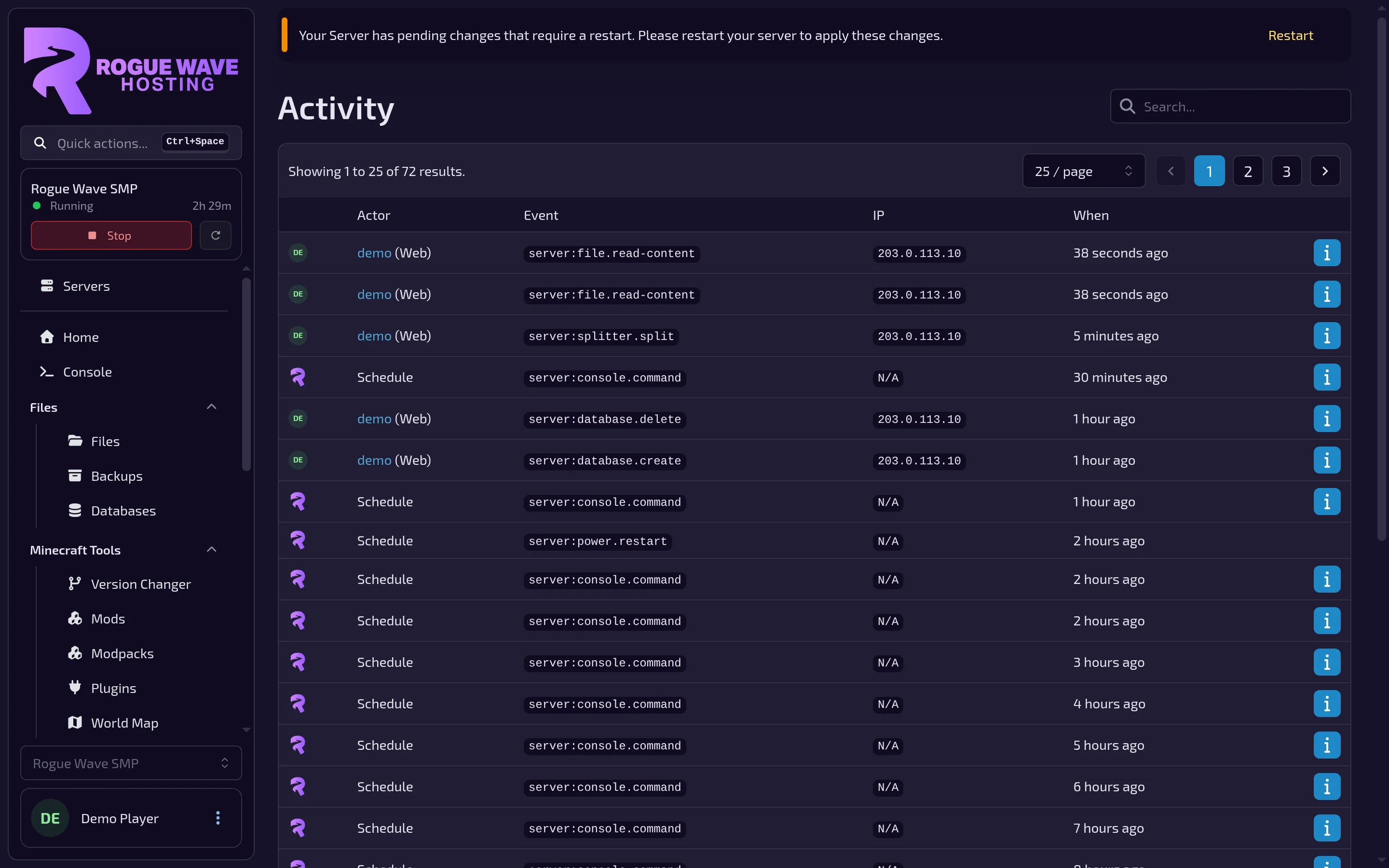
Each row in the Activity table includes five columns:
- Actor — Shows who triggered the event: a named panel user (for example,
demo (Web)) or an automated system actor such asSchedule. - Event — The structured action identifier (for example,
server:console.command,server:power.restart,server:file.read-content,server:database.create,server:database.delete, orserver:splitter.split). - IP — The client IP address that performed the web or SFTP action (for example,
203.0.113.10), orN/Afor server-side automated events like schedules. - When — Relative timestamp (hover for the exact date and time).
- Details (
ibutton) — Click the blueiicon on the right side of a row to expand full event metadata—such as the exact file path accessed, the console command run, or the database name affected.
Searching & Auditing Events
Use the Search… input in the top-right corner and the 25 / page selector to filter through your history quickly:
| What You’re Investigating | What to Search / Check |
|---|---|
| Unexpected server restarts | Look for server:power.restart or server:power.stop and check whether the Actor is a Schedule or a specific subuser. |
| Config or file changes | Search server:file. and click the blue i button to see which file was read, written, uploaded, or deleted—and by whom. |
| Database or backup changes | Search server:database. or server:backup. to confirm who created, rotated, or deleted a database or snapshot. |
| Console commands | Search server:console.command to verify scheduled commands (save-all) or trace admin commands sent through the web console. |
| Account security check | Scan the IP and Actor columns for unfamiliar IP addresses or unexpected logins from shared staff accounts. |