Minecraft modpack server hosting
Install any server pack from CurseForge or Modrinth in one click, run it on Forge, NeoForge, Fabric, Quilt, and back up before every update. Flagship AMD hardware for $1 per GB of memory.
- $4/moStarting price
- 4–32 GBMemory
- 50 GBStorage
- 10Backup slots
How it works
From checkout to modded in three steps
- 1
Pick your memory
Choose 4 to 32 GB at $1 per GB and check out. Your server is ready in 60 seconds to 3 minutes.
- 2
Find your modpack
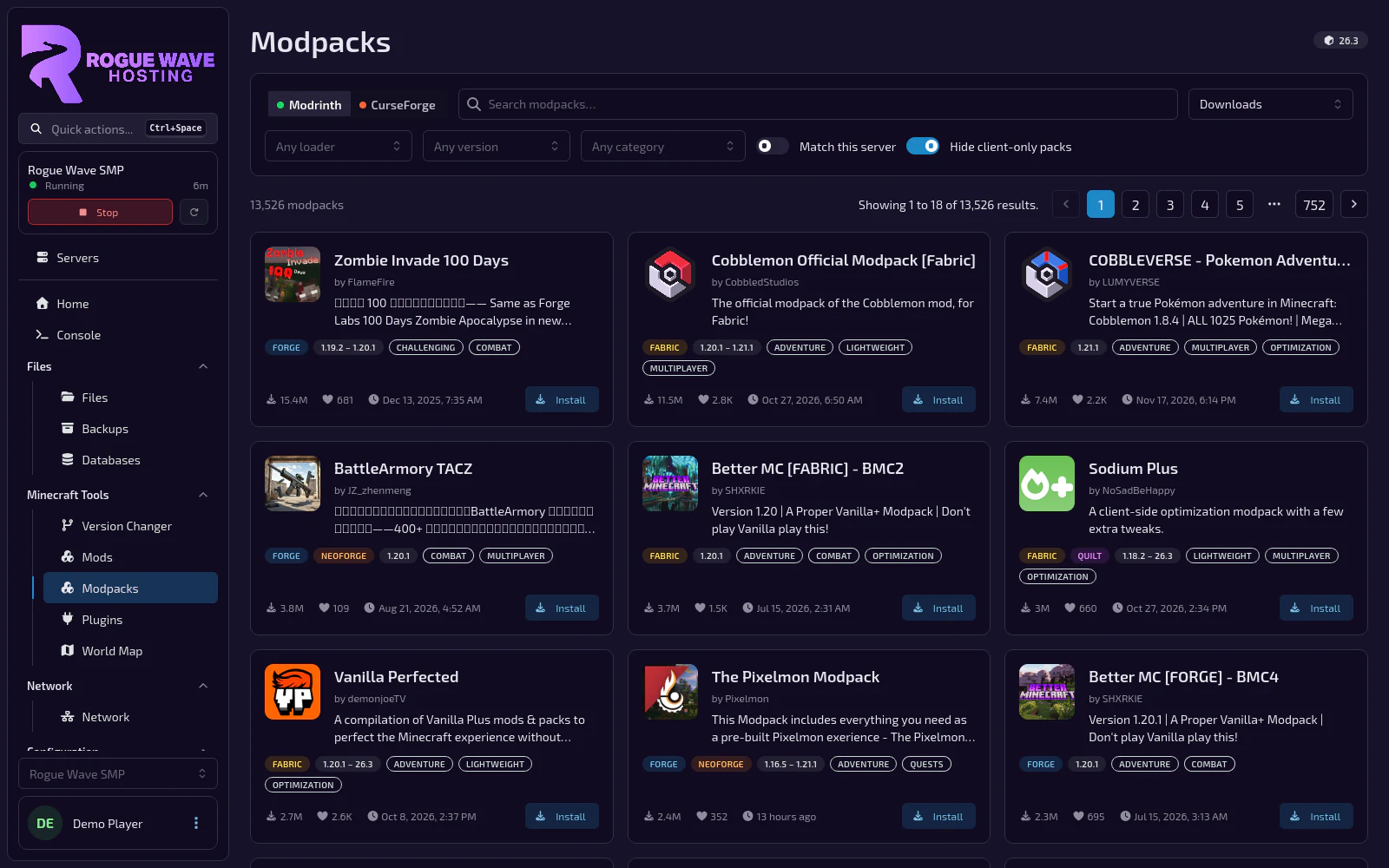
Open Minecraft Tools › Modpacks in the game panel and search CurseForge or Modrinth by name, loader, version or category.
- 3
Install and play
Click Install, start the server from the console and send your players the address.
Built for modded
Everything a modded server needs
Modpack tools sit in the same game panel as your console, files and backups.
- One-click
CurseForge & Modrinth modpacks
Search both catalogues from the panel, filter by loader, Minecraft version and category, hide client-only packs and install in one click.
- mcjars
Every mod loader
Forge, NeoForge, Fabric, Quilt and every version and build listed on mcjars, switchable from the Version Changer.
-
Modded JVM preset
A Modded G1GC preset tuned for large modpacks, plus Generational ZGC and Shenandoah, in the visual Startup Flags editor.
-
Add mods on top
Add extra mods with the Mod Installer for Modrinth and CurseForge, or drop jars into the mods folder over SFTP.
-
10 backups, 50 GB storage
Back up before every pack update and restore in a click if it breaks your world. Big packs fit in the included storage.
-
Several packs, one plan
Split one plan into independent servers with the Server Splitter, 3 included and up to 10, and run a different pack on each.
-
Bring your modded server
The Server Importer pulls your world, mods and configs from your old host over SFTP, with live progress.
-
Live world map
See players and mobs on a top-down map, teleport players and edit chunks with automatic backups.
- Free
Free subdomain
Give players a readable server address instead of an IP with the Subdomain Manager.
Popular modpacks
Host the pack your group already plays
Thousands of server packs on CurseForge and Modrinth install from the panel, including:
- All the Mods 10
- All the Mods 9
- Prominence II
- Better MC
- RLCraft
- Create: Above and Beyond
- SkyFactory 4
- Vault Hunters
- Enigmatica 2: Expert
- DawnCraft
- Cobblemon Official Modpack
- The Pixelmon Modpack
Pack on neither platform? Upload its server files with the file manager or SFTP, or ask support to help.
FAQ
Modpack hosting questions
Which Minecraft modpacks can I install?
Any server-compatible modpack on CurseForge or Modrinth. The Modpacks page in the game panel searches both, filters by mod loader, Minecraft version and category, and hides client-only packs, then installs the one you pick in a click. Installing Minecraft Modpacks guide →
Which mod loaders and server types are supported?
Forge, NeoForge, Fabric and Quilt for mods, Paper, Purpur, Spigot and Folia for plugins, Velocity and BungeeCord for proxies, plus every other server type and build listed on mcjars. Switch between them from the Version Changer. Changing Minecraft Server Versions guide →
How much memory does my modpack need?
It depends on the pack and on how many people play, so start from the server recommendation on the pack's CurseForge or Modrinth page. Every size costs $1 per GB, from 4 GB ($4/mo) to 32 GB ($32/mo), and you can upgrade from the client portal as your world grows.
Can I run a modpack that isn't on CurseForge or Modrinth?
Yes. Upload the pack's server files with the file manager or any SFTP client. If the pack needs a particular loader or version, set it in the Version Changer, and open a ticket if you get stuck.
Can I add my own mods or plugins to a modpack?
Yes. The Mod Installer adds mods from Modrinth and CurseForge, the Plugin Installer adds plugins from Modrinth, Hangar and CurseForge, and you can upload any jar with the file manager or SFTP.
Do my players need the modpack installed too?
Usually, yes. Most modpacks need the same pack and version on every player's computer. Players install it with the CurseForge app or a Modrinth launcher, then join your server's address.
Can I run more than one modpack on one plan?
Yes. The Server Splitter divides one plan's CPU, memory and disk into independent servers, 3 included and up to 10 as an add-on, so each one can run a different pack. Using the Server Splitter guide →
Can I move my modded server from another host?
Yes. The Server Importer pulls your world, mods and configs straight from your old host over SFTP, with password or SSH key login and live progress. Importing an Existing Server guide →
What should I do before updating a modpack?
Take a backup from the game panel. Every server includes 10 backup slots, so you can roll back if a pack update breaks your world.

Start your modpack server.
From $4/mo, with a 7-day money-back guarantee on new servers.